Client Portal Mobile App Overview
The AdvisorEngine Client Portal Mobile App service allows your firm to present clients with a branded, mobile-friendly version of the Client Portal, available to your clients through the iOS App Store and Google Play Store.
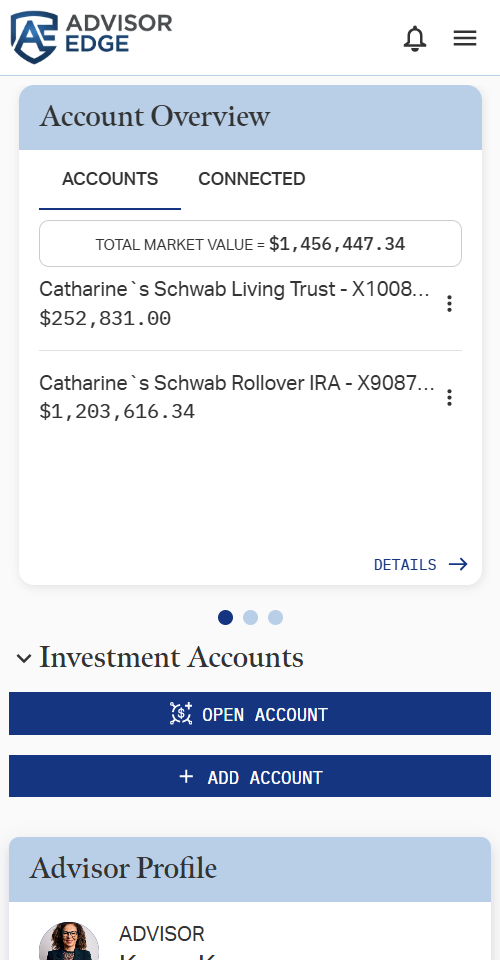
The app functions the same as accessing your firm’s Client Portal through a web browser on a mobile device, but offers the convenience of being contained in an app on your clients’ mobile device, branded with your firm name and logo. As an added benefit, the app supports biometric login, allowing users to log in with fingerprint, face recognition, and other such unlock features.
How to Get the Client Portal Mobile App
If you are interested in offering a mobile app to your clients, contact sales@advisorengine.com or reach out to your AE Sales Rep directly.
Sales and our tech teams will work with your firm to build an app to your firm branding and deploy it to the Google Play and iOS App Stores. (Note that this process can take a few weeks once initiated.)
Sharing the App with Clients
Once your mobile app has been deployed, you can create links your app in each app store and host them on your firm website, email the links directly to clients, or just show your client how to search for the app during their intake. The app will be searchable in both storefronts by your firm name just like any other mobile app.
As said before, the app works the same as using the Client Portal from a web browser on any mobile device, so once a client has downloaded the app, they can log in and navigate the same if they were accessing the client portal from anywhere else.
Related Articles
Client Portal Mobile Navigation
When accessed from a mobile device or through the Mobile App, the interface of the Client Portal is compressed and some navigation elements are rearranged to accommodate the smaller screen size. All functionality remains the same as the full Client ...Client Portal Navigation and Features
The AE Client Portal serves as a white-label interface for you to convey relevant information to your clients. It also enables your clients to communicate with you and self serve various tasks. The scope of features available to a client in the ...Setting Client Portal Mobile App Biometric Login
The AdvisorEngine Client Portal Mobile app has support for biometric logins (fingerprint, face recognition, etc.) supported by your device. If the device you are using does not support biometrics or you have not set up any biometrics on the device, ...Setting Up Client Portal Notifications
Notifications appear on the right-hand sidebar of the Client Portal while on the Overview tab. Primary notifications on the Client Portal are automatically provided and controlled by the Portfolio Manager. You may also add and push Secondary ...Client Portal Settings and Branding
The Client Portal Site Settings page, located at Run Business > Firm Profile > Client Portal, allows you to configure the experience your clients have on your Client Portal. Many of these settings will be established by your Onboarding Engineer in ...