Searching Overview
Any Grid in AdvisorEngine CRM with a Search Bar in the upper right corner may be searched to refine the view of data.

Different search options are available depending on the Grid you begin searching from.
Record Search
Differing from the other types of searches, available from nearly anywhere in AE CRM from the main header bar, the Record Search bar allows you to search for and open any Record.
Basic Search
Basic Searches are performed by typing directly into the Search Bar. The criteria applied depends on the Workspace the search is made in. See Performing Basic Searches for a full list of the criteria used in each section of AE CRM.
Quick Search
Quick Searches allow you to quickly narrow a Grid view based on specific criteria in select workspaces. These special searches may be performed in the Records Workspace and the Actions Workspace. See Performing Quick Searches for full details on the available search options.
Advanced Search
Advanced Searches allow for very specific and granular searching using a range of criteria and search rules. Advanced Searches are also the basis of all reports created using the Report Assistant. See Creating Advanced Searches to begin using this feature.
Recent Search
Clicking on the Search Bar will present you with a drop-down list of search options, including a list of your last five Quick and Advanced Searches in the current workspace. Click the name of the saved search to apply it immediately.
Clearing Searches
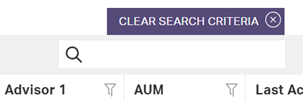
Searches that are actively filtering a Grid show as an indicator above the search bar. If you are using a saved search, the name of the search displays here. Click  to clear the search.