Notifications Overview
Notifications, triggered by Alerts, let you know when specific events have occurred within the AdvisorEngine software or at the custodian. These notifications are shown within AdvisorEngine and many of them can be set to send an email when triggered if needed.
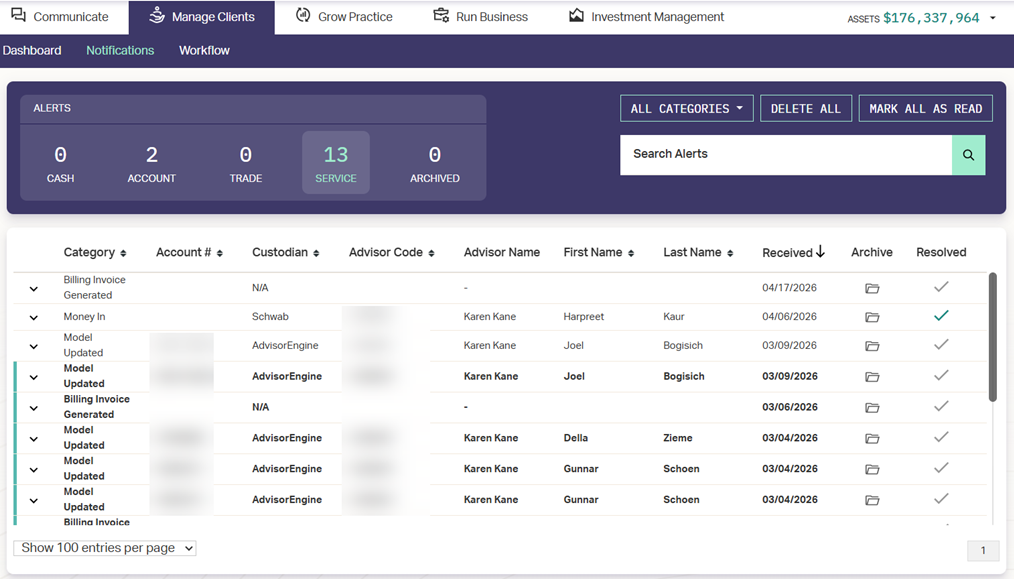
Alert Types
Notifications come in the form of Cash, Account, Trade, or Service Alerts.
- Cash: Reflects changes in a client’s account balance, including New Funding, Cash In, Cash out, and preemptive low balance notifications.
- Account: Includes all account-specific actions or updates around New Accounts, Closed Accounts, Transfers, and Client information changes.
- Trade: Triggered for any trade-related execution for applicable accounts, including Orders Filled, Trade Confirms, and Options (if applicable).
- Service: Cover all alerts not included in the previous 3 categories.
- Archived: Any service alerts that have been moved to an Archived status.
Viewing Notifications
Notifications are accessed either by navigating to Manage Clients > Notifications or by clicking the notification alert in the upper-right of the Portfolio Management Suite  . The number on the bell indicates how many unread notifications you have.
See Viewing Notifications for more details.
Customizing Notification Preferences
Each user can customize which notifications they receive and whether or not an email notification is sent if available.
See Customizing Notification Preferences for more details.