Using and Managing Advanced Searches

Using and Managing Advanced Searches

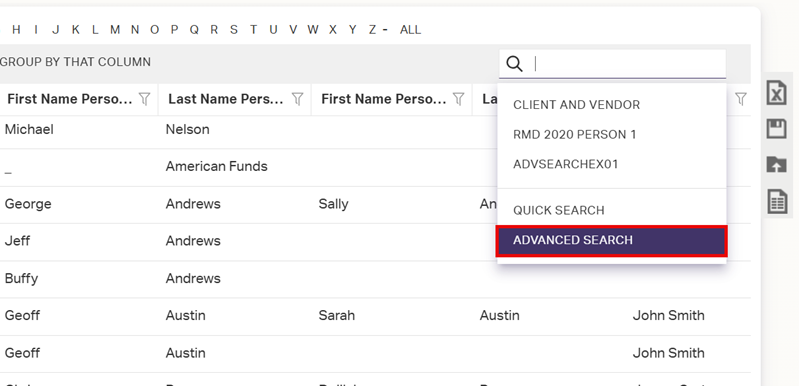
  1. Click the Search Bar.
  2. Click Advanced Search from the drop-down menu.
  3. Select the Advanced Search to apply from the list.
  4. Click Apply.

Editing Saved Advanced Searches

  1. Click the Search Bar.
  2. Click Advanced Search from the drop-down menu.
  3. Select the Advanced Search to edit from the list.
  4. Click Edit.
  5. Adjust the definition of the search as needed. See Creating Advanced Searches for more information on the Criteria Chooser.
  6. Select how to use your new criteria.
    • Click Apply to simply see the results of your criteria.
    • Click Save & Apply to save your changes. You can save with the same name to overwrite the previous Advanced Search or you can enter a new name to save a new copy of this search.

Deleting Saved Advanced Searches

  1. Click the Search Bar.
  2. Click Advanced Search from the drop-down menu.
  3. Locate the Advanced Search to delete from the list.
  4. Click delete at the end of the row (You may need to scroll horizontally to see this button).
    • Related Articles

    • Creating Advanced Searches

      Advanced Searches are the most powerful and flexible method for returning specific information from your CRM database. They allow you to quickly see exactly what you’re looking for and also form the foundation of reports created in the Report ...
    • New User Module 2-3: Grids and Searching

      Grid Navigation Learn all the flips and switches in a Grid to help you refine the view of your data. Navigating Grids Grid Tools Learn about the various tools in a Grid that let you control what data you see. Grids Overview Sorting Grids Filtering ...
    • Managing User Profiles

      An AdvisorEngine CRM User is anyone who has (or had) unique login credentials for accessing your CRM database. The User Profiles Grid (Settings > User Profiles) shows you all Users ever created in your database, both Active and Inactive. In order to ...
    • Creating and Using Grid Templates

      If you have used the Grid tools to arrange a custom Grid view that suits your needs, you can save that particular arrangement of filters, groups, sorts, columns, display items, and even searches as a Grid Template which may be quickly recalled later. ...
    • Managing Minors

      As each firm does business differently, there is no one best way to track minors in AdvisorEngine CRM. There are three viable options that we recommend depending on your usage: Create a new Record for each minor and link the Records via ...