Manage Clients > Operational Tab
Operational Summary
See the progress and status of all opportunities relating to the account, client, or household.
Notifications
Display any alerts specific for the Household, Client, or Account selected. This functions as a filtered view of the Notifications section of the Portfolio Manager, displaying only the notifications pertaining to the selected Household, Client, or Account. See Notifications Overview for details.
Documents
Displays any documents that have been uploaded by the firm, reports created from Report Packages that have run, Custodial documents, and any account opening documents that have been signed via digital signature process.
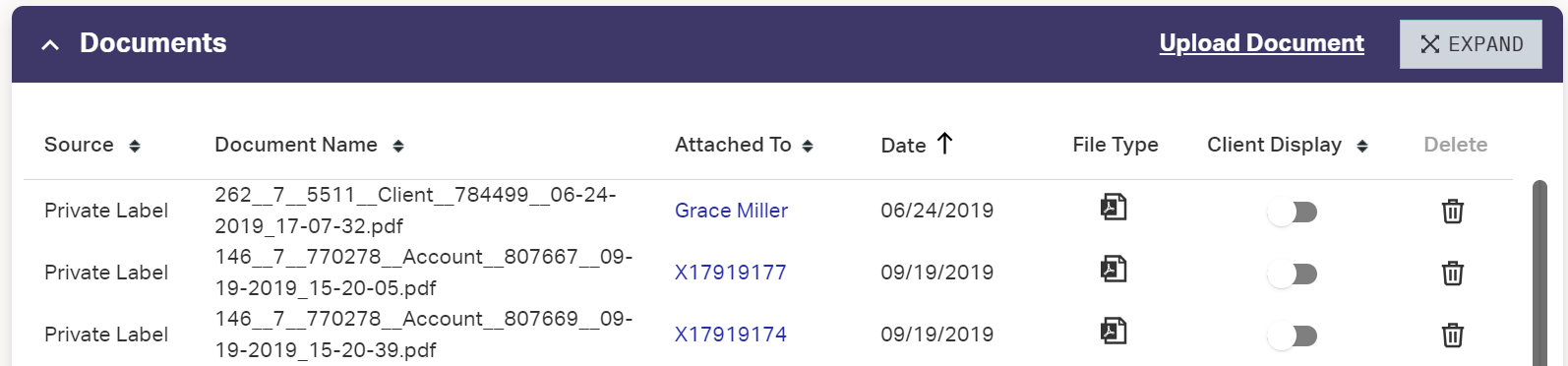
- Source: Who uploaded the document
- Document Name: The name of the document
- Attached To: The client’s name
- Date: Date the document was uploaded
- View: Viewable PDF of the document
- Client Display: Make document visible to client through the Client Portal. If disabled, the document is visible internally only.
- Delete: Delete the document. Cannot be undone.
To manually add a document to the client's vault:
- Click in the upper-right of the document widget.
- Navigate to and select the document on your local machine.
- Click to upload the file to the Vault.
The Client Display toggle is set to Off by default for uploaded documents. Set the toggle on to show the document on the Client Portal.
Reports that have been run will show in the Documents section of the Account, Client, or Household they belong to.
- Documents from Report Packages will show a Source of AdvisorEngine. The Document Name will be auto-generated.
- Documents can be viewed by clicking the PDF icon
 .
. - Documents can be removed from or enabled for the Client Portal view by clicking the toggle for a document.
- Documents can be deleted entirely by clicking the Delete
 command.
To delete a document from the client's vault:
- Click the delete control at the end of the document's row.
- You are asked to confirm the deletion. Click to proceed. This cannot be undone.
New Account Information
Report Packages
Used to set which Report Package is assigned to the Household, Client, or Account. See Customizing a Client’s Report Packages and Manually Running Report Packages for more information.
Proposals
Lists the investment policy statements that have been filled out and are tied to the Household, Client, or Account.
Account Maintenance
Lists a history of any Account Maintenance workflows in progress or completed on the accounts. Click the Plus a the top right to start a new Account Maintenance workflow.